Fdream's Blog
专注于WEB前端开发
Powered by Google

点击显示/隐藏部分页面

9 多云 2005-10
Fdream 发表于 Ajax Web, 已被阅读 18009 次, 评论 0 条
关键词:JavaScript JS CSS 源码
[ 阅读字体大小: ]

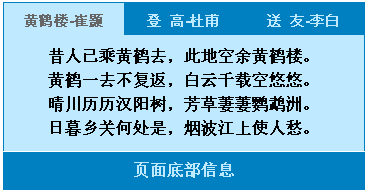
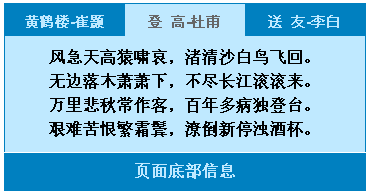
看看效果先:

默认关闭状态:

打开状态一:

打开状态二:

网页代码如下:

<html>

<head>

<style type="text/css">

<!--

body,td,th {

font-family: Arial, Helvetica, sans-serif;

font-size: 14px;

font-weight:bold;

color: #333333;

}

body {

padding:0px;

text-align:center;

}

.topmenu{

margin-left:auto;

margin-right:auto;

margin-bottom:0px;

border-top:1px solid #0080c0;

border-left:1px solid #0080c0;

border-right:1px solid #0080c0;

width:362px;

color:#BFE9FF;

font-size:14px;

text-align:center;

}

.menucontenta{

float:left;

margin:0px;

width:120px;

height:32px;

padding-top:10px;

background:#0080C0;

}

.menucontenta a:link {

color:#BFE9FF;

text-decoration:none;

}

.menucontenta a:visited {

color:#BFE9FF;

text-decoration:none;

}

.menucontenta a:hover{

color:#fff;

text-decoration:underline;

}

.menucontentb{

float:left;

margin:0px;

width:120px;

height:32px;

padding-top:10px;

background:#BFE9FF;

}

.menucontentb a:link {

color:#666;

text-decoration:none;

}

.menucontentb a:visited {

color:#666;

text-decoration:none;

}

.menucontentb a:hover{

color:#000;

text-decoration:underline;

}

.para{

clear:both;

width:362px;

margin:0px;

padding:10px;

border-left:1px solid #0080c0;

border-right:1px solid #0080c0;

background-color:#BFE9FF;

text-align:center;

line-height:24px;

color:#f90;

font-size:16px;

}

.bottom{

margin-left:auto;

margin-right:auto;

padding:10px;

margin-top:1px;

width:362px;

background-color:#0080C0;

border-left:1px solid #0080c0;

border-right:1px solid #0080c0;

text-align:center;

color:#BFE9FF;

font-size:16px;

}

-->

</style>

<script type="text/javascript">

<!-- Begin

var subs_array = new Array("sub1","sub2","sub3");

var mains_array = new Array("main1","main2","main3");

function displaySubs(the_sub,the_main){

if (document.getElementById(the_sub).style.display==""){

document.getElementById(the_sub).style.display = "none";

document.getElementById(the_main).className ="menucontenta";

return;

}

for (i=0;i<subs_array.length;i++){

var my_sub = document.getElementById(subs_array);

var my_main = document.getElementById(mains_array);

my_sub.style.display = "none";

my_main.className ="menucontenta";

}

document.getElementById(the_sub).style.display = "";

document.getElementById(the_main).className = "menucontentb";

}

// End -->

</script>

<meta http-equiv="Content-Type" content="text/html; charset=gb2312">

<title>点击显示隐藏部分页面</title>

</head>

<body>

<div class="topmenu">

<div class="menucontenta" id="main1"><a href="javascript:void(0)" onClick="displaySubs('sub1','main1')" onFocus="if(this.blur)this.blur()";>黄鹤楼-崔颢</a></div>

<div class="menucontenta" id="main2"><a href="javascript:void(0)" onClick="displaySubs('sub2','main2')" onFocus="if(this.blur)this.blur()";>登 高-杜甫</a></div>

<div class="menucontenta" id="main3"><a href="javascript:void(0)" onClick="displaySubs('sub3','main3')" onFocus="if(this.blur)this.blur()";>送 友-李白</a></div>

</div>

<div class="para" id="sub1" style="display:none">

<font color="#333" font-size="16px">

昔人已乘黄鹤去,此地空余黄鹤楼。<br>

黄鹤一去不复返,白云千载空悠悠。<br>

晴川历历汉阳树,芳草萋萋鹦鹉洲。<br>

日暮乡关何处是,烟波江上使人愁。<br>

</font>

</div>

<div class="para" id="sub2" style="display:none">

<font color="#333" font-size="16px">

风急天高猿啸哀,渚清沙白鸟飞回。<br>

无边落木萧萧下,不尽长江滚滚来。<br>

万里悲秋常作客,百年多病独登台。<br>

艰难苦恨繁霜鬓,潦倒新停浊酒杯。<br>

</font>

</div>

<div class="para" id="sub3" style="display:none">

<font font-size="16px" color="#333">

青山横北郭,白水绕东城。<br>

此地一为别,孤蓬万里征。<br>

浮云游子意,落日故人情。<br>

挥手自兹去,萧萧斑马鸣。<br>

</font>

</div>

<div class="bottom">页面底部信息</div>

</body>

</html>

Related articles 您可能对这些文章也感兴趣:
Related comments 与该文相关的评论:(我也想说几句)
Add a comment 我来说两句: 
禁止表情
禁止UBB
禁止图片
识别链接
识别关键字
表  情
arrow
用户名:   密码:  (匿名可不写) 同时注册?
验证码:   看不清?换个图片  看不清楚?换个图片

 
Copyright © 2005-2008,Fdream All Rights Reserved
Processed in 0.1718772 second(s) , unknow queries
Powered by OWord V0.1, Even Not Alpha
(此博客程序为半成品,请勿索取,以免给您的心灵造成创伤^_^)
鄂ICP备05026031号